 Employment Hero
Introduction
Note
API access is currently available on a Platinum subscription and above. If this piques your interest, kindly refer to this article on how you can upgrade your subscription: here or reach out to us via live chat on the HR platform
The Employment Hero API is a RESTful-based API that returns JSON-encoded responses and uses standard HTTP response codes, authentication, and verbs.
Once connected, you'll have access to valuable HR data which can then be leveraged within your app or integration to power workflows and insights. In order to test the Employment Hero API, we recommend using a Bearer token for authentication - see this section for more information.
Base URL: https://api.employmenthero.com
Client Libraries: By default, the Employment Hero API Docs demonstrate using curl to interact with the API over HTTP.
In order to test the Employment Hero API, we recommend using Postman along with a Bearer token for authentication - see the Authentication section for more information on Bearer token-based authentication. Refer to Postman Official Documentation on how to import the Postman collection below.
Download Postman Collection
API Versioning Policy
We are committed to providing a stable and reliable API for our developers. To ensure continuity and minimize disruption, we follow a clear versioning policy.
Our API versioning is managed by a version number, for example, https://api.employmenthero.com/api/v1/.... This version number changes only when we introduce breaking changes.
A breaking change is any modification that could disrupt the functionality of a client's existing integration. This includes, but is not limited to:
- Removing or renaming a field.
- Changing the data type of an existing field.
- Altering the fundamental behaviour of an endpoint.
These changes will always result in a new API version (e.g., v1 to v2).
Non-breaking changes are additive and backward-compatible. They will be introduced into the existing API version without creating a new one. Examples of non-breaking changes include:
- Adding new fields to an existing endpoint's response.
- Introducing new endpoints.
- Adding new optional parameters to an existing endpoint.
This approach allows you to confidently build against a stable version, knowing that non-breaking updates will not require you to rewrite your code.
Handling Regional Data
Our platform serves a global user base, and as such, some API responses and functionalities are tied to the regional data of the employee. To help you understand and integrate with these differences, we have established a clear policy for handling regional data.
Global vs. Regional Endpoints and Fields
Global: Unless explicitly tagged, all APIs and fields are considered global. This means they return consistent data regardless of the employee's work location.
Regional: Some APIs and fields are region-specific. This means the data returned will vary based on the employee's assigned work location. To identify these, we use a specific tag format:
- Australia: 🇦🇺 AU
- Malaysia: 🇲🇾 MY
- Singapore: 🇸🇬 SG
- New Zealand: 🇳🇿 NZ
- United Kingdom: 🇬🇧 UK
- Canada: 🇨🇦 CA
Employees working in other regions will default to Australian fields, as consistent with our platform UI.
Regional Field Behavior
- A regional field will only be present in the response if the employee's work location matches the specified region.
- For employees outside that region, the field will be omitted entirely from the response body. You should not expect to receive a null value for these fields in such cases.
Regional API Behavior
- You can still call a regional API for employees in other regions.
- However, for employees outside the specified region, the response will likely contain null or empty values for the regional data fields. This is by design, as the data does not exist for that location.
Terminology Mapping
When working with the Employment Hero API, you may notice that some terminology differs between the API and the Employment Hero user interface (UI). This section clarifies these differences to help you navigate between the API documentation and the platform.
Teams to Groups
The Employment Hero platform transitioned from "Teams" to "Groups" in the user interface. For legacy endpoints, the API continues to use "team" terminology in endpoints, field names, and responses to maintain backward compatibility.
This is a UI-only change with no breaking API changes. No code changes are required for existing integrations.
Example
When you see "Groups" in the UI:
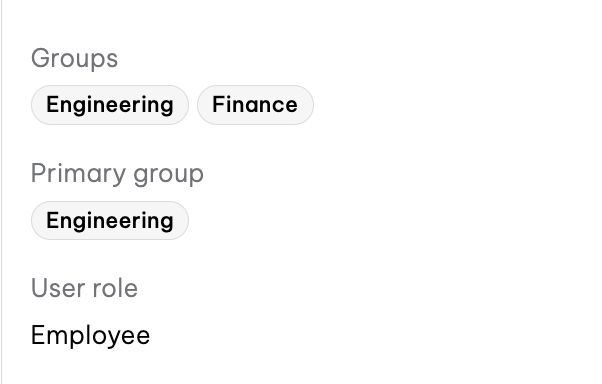
The API uses teams:
{
  "teams": [
    { "id": "143ed07a-e7d1-4c19-ade6-b0ffe9123d19", "name": "Engineering" },
    { "id": "36bd330e-3a6b-4539-8c86-a414fc3b485e", "name": "Finance" }
  ]
}
Errors
Employment Hero uses conventional HTTP response codes to indicate the success or failure of an API request. Codes in the 2xx range indicate success. Codes in the 4xx range indicate an error that failed given the information provided (e.g., a required parameter was omitted, a charge failed, etc.). Codes in the 5xx range indicate an error with Employment Hero's servers.
Response Body
An HTTP status code value, without the textual description. Example values include: 400 (Bad Request), 401 (Unauthorized), and 404 (Not Found).
A container for the error information.
A container for the error details.
Note
Rate limits are currently set to 20 requests per second and 100 requests per minute. If you reach a limit before the window resets, please wait until the rate-limit window has passed and try again.
Response
400 Bad Request -- Invalid request body or parameters.401 Unauthorized -- Invalid or missing authentication token.403 Forbidden -- Insufficient platform user permissions to access requested resource.404 Not Found -- The specified resource could not be found.406 Not Acceptable -- You requested a format that isn't json.422 Unprocessable Entity -- Validation errors in the request body429 Too Many Requests -- You have exceeded the rate limit. Please try again later.