 Employment Hero
Webhook
Note
Webhooks access is currently available on a Platinum subscription and above. If this piques your interest, kindly refer to this article on how you can upgrade your subscription here or reach out to us via live chat on the HR platform
Registering a Webhook
Webhook Properties
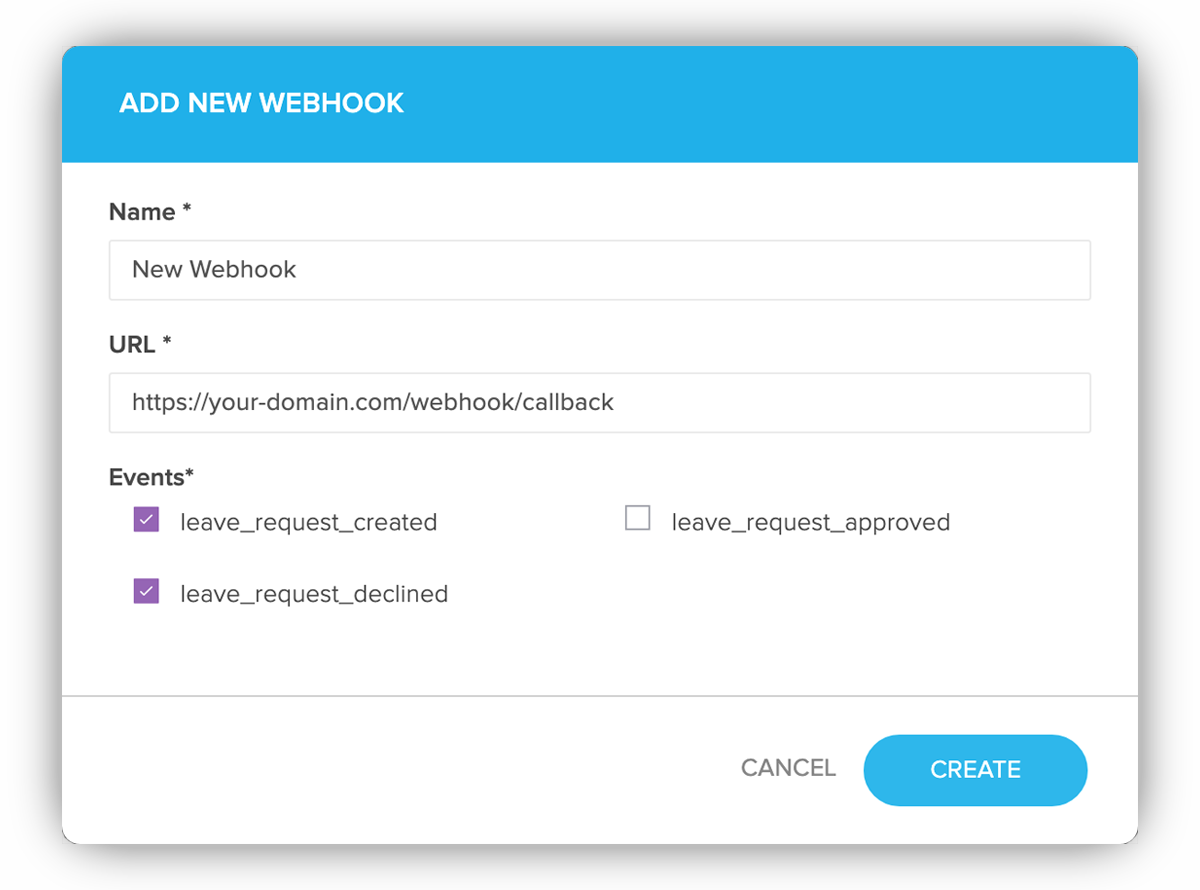
To register a webhook, visit the My Webhooks page in the Developer Portal then click the Add Webhooks button. The webhook has 3 required fields:
| Field | Description |
|---|---|
| Name | Name of webhook. |
| URL | The URL for the webhook event callback. Please note that for security purposes, we request that you provide HTTPS URIs. |
| Events | The events that will trigger this particular webhook. |
Note
Once a webhook has been set up, you can update your webhook properties through the webhook details page. The new webhook will become active immediately.
Webhook Events
Webhook events that are currently available are:
- Employee Created
- Employee Onboarded
- Employee Updated
- Employee Offboarding
- Time Off Request Created
- Time Off Request Updated
- Time Off Request Approved
- Time Off Request Declined
- Time Off Request Deleted
- Employee Bank Account Created
- Employee Bank Account Updated
- Employee Bank Account Deleted
- Employment History Created
- Employment History Updated
- Employment History Deleted
- Timesheet Entry Created
- Timesheet Entry Updated
- Timesheet Entry Deleted
- Certification Created
- Certification Updated
- Certification Deleted
- Certification Archived
- Member Certification Created
- Member Certification Updated
- Member Certification Approved
- Member Certification Declined
- Member Certification Expired
- Member Certification Archived
- Member Certification Deleted
- Custom Form Response Submitted
- Custom Form Response Partially Approved
- Custom Form Response Approved
- Custom Form Response Declined
- Key Result Created
- Key Result Updated
- Key Result Deleted
- Goal Created
- Goal Updated
- Goal Deleted
- Pay Detail Updated
Webhook Callback
When an event occurs, it will trigger an HTTP request to the URL configured for the webhook. If the callback URL does not respond with a successful result (i.e. HTTP 200), it will be retried for a maximum of 3 times. If the callback URL still responds unsuccessfully, the webhook event will be marked as failed.
Schema
The type of webhook event
The payload of webhook event
Callback Body
{ "data": { "id": "1c8a8e41-82c8-4311-8115-07994dd28ac2", "approved": true, "end_date": "2020-02-04", "start_date": "2020-02-04", "employee_id": "ba967883-a3db-44a0-b807-bfac746599f7" }, "event": "leave_request_approved"}To see the history of webhook events, visit the Webhook
History
page or Webhook > Event History on the navigation bar from the Developer
Portal.
Verify Webhook Request
To ensure the authenticity and integrity of webhook requests from Employment Hero, you must verify the request signature. This confirms that the request is genuinely from Employment Hero and hasn't been tampered with.
Each webhook request from Employment Hero includes two headers:
| Header | Description |
|---|---|
| X-EmploymentHero-Signature | The SHA256 hash signature of the request. |
| X-EmploymentHero-Timestamp | The timestamp of the request. |
The signature is generated using a hash-based message authentication code (HMAC) with SHA-256, which signs the combination of the request payload and the timestamp.
How to Verify the Signature
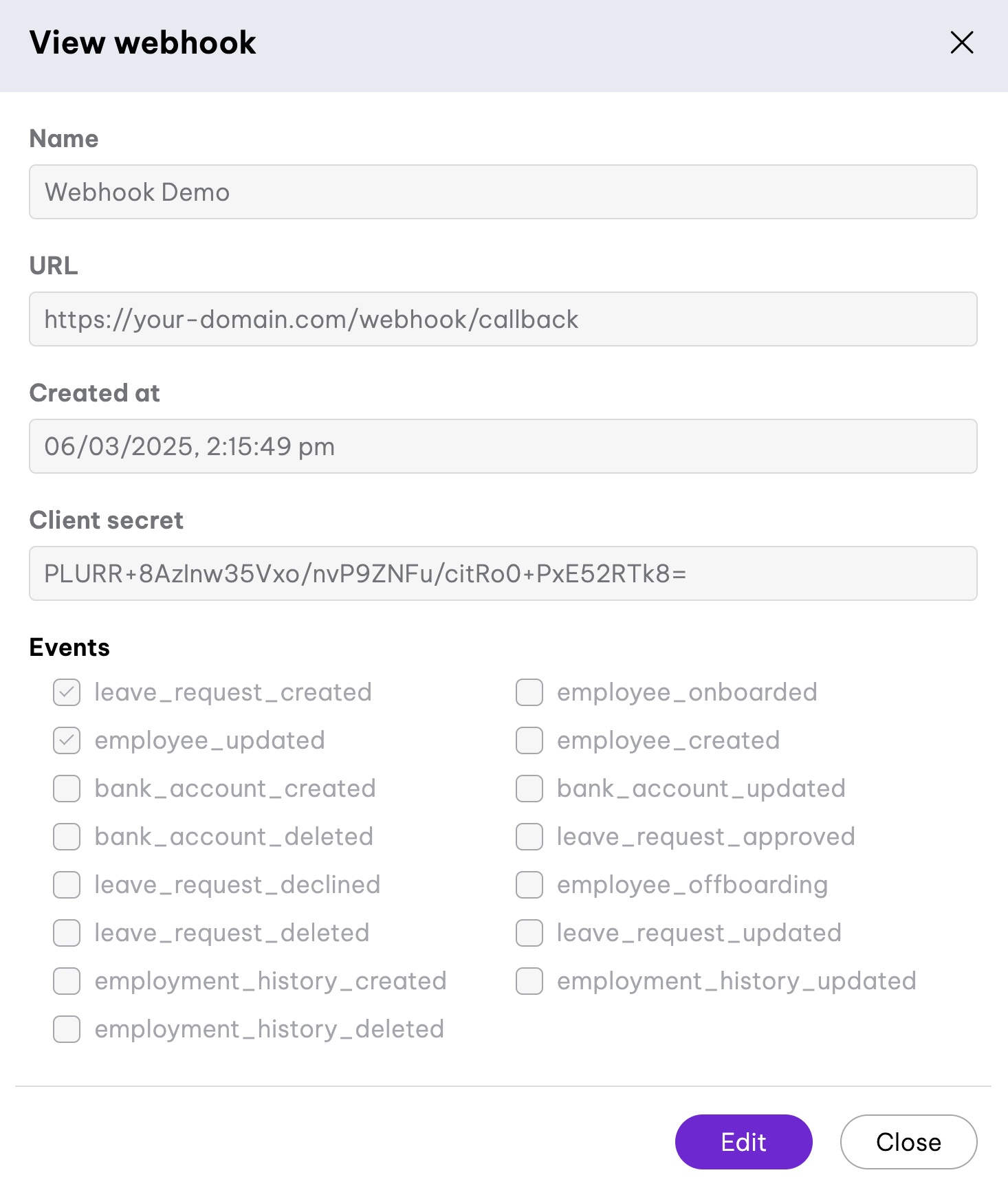
- Get Your Secret Key
- Your secret key is available on the webhook configuration page in the Developer Portal. Use this key to generate the hash and verify the request.
- Extract Headers and Payload
- Retrieve the X-EmploymentHero-Signature header from the request.
- Retrieve the X-EmploymentHero-Timestamp header from the request.
- Get the raw JSON payload of the request.
- Concatenate Timestamp and Payload
- Combine the timestamp and the payload with a dot (
.) separator:data = "#{timestamp}.#{json_payload}"
- Generate HMAC SHA256 Hash
- Use your secret key to generate the SHA256 HMAC hash of the concatenated string.
- Compare Signatures
- Compare the generated hash with the value in X-EmploymentHero-Signature.
- If they match, the request is verified.
- If they do not match, reject the request.
require 'openssl'
require 'active_support/security_utils'

def verify_signature(secret_string, timestamp, payload, signature)
  data = "#{timestamp}.#{payload}"
  secret = Base64.decode64(secret_string)
  digest = OpenSSL::HMAC.digest('SHA256', secret, data)
  expected_signature = Base64.strict_encode64(digest)

  ActiveSupport::SecurityUtils.secure_compare(expected_signature, signature)
end
Bank Account Data
Schema
The bank account id
The employee id
The bsb number of bank account
The account name of bank account
The account number of bank account
Determine bank account is primary or not
Callback Body
{ "event": "bank_account_created", "data": { "id": "78bc2d65-bf9e-434f-8b78-2367f56878ad", "employee_id": "92ab2d65-cd9e-123d-2b71-1234d56878cd", "bsb": "123123", "account_name": "mew123", "account_number": "123123", "primary_account": false }}Certification Data
Schema
The certification id
The name of the certification
The description of the certification
The organisation id associated with the certification
Callback Body
{ "event": "certification_created", "data": { "id": "a1b2c3d4-e5f6-7890-abcd-ef1234567890", "name": "First Aid Certificate", "description": "Basic first aid and CPR certification", "organisation_id": "c937993f-3573-40a7-a386-9f316b81b94a" }}Custom Field Data
Schema
The custom field id
The name of the custom field
The hint of the custom field
The description of the custom field
The type of the custom field
Returns true if the custom field captured during onboarding
The organisation id associated with the custom field
Returns true if the custom field is mandatory
Lists the permissions for the custom field
Lists the options for the custom field when type is either single_select or multi_select
Callback Body
{ "event": "custom_field_created", "data": { "id": "922511dc-2af4-4513-83eb-960c2006aadc", "hint": "Legal nationality as stated in identification documents", "name": "Nationality", "type": "single_select", "required": true, "description": "This field is typically the legal nationality as stated in identification documents.", "in_onboarding": true, "organisation_id": "c937993f-3573-40a7-a386-9f316b81b94a", "custom_field_options": [ { "id": "0d0cd804-578d-424d-a3ea-19b8d2bafd5c", "value": "American" }, { "id": "985f4441-0f9d-4f68-a8e6-57a228167fde", "value": "Australian" }, { "id": "773c0e77-811a-4e33-8865-e56814141547", "value": "Vietnamese" } ], "custom_field_permissions": [ { "id": "1e807c07-4bf4-44d9-8477-d1e602060fda", "role": "employee", "permission": "editable" }, { "id": "db766044-b1a0-4688-9381-c6ef861efc16", "role": "manager", "permission": "editable" }, { "id": "41e0434a-722c-4626-8dcf-3badb5ff0cf0", "role": "employee", "permission": "viewable" }, { "id": "f3cfaa08-b3c9-42eb-8fed-9115679004b1", "role": "manager", "permission": "viewable" } ] }}Custom Form Response Data
Schema — Submitted / Approved / Declined
The custom form response id
The organisation id
The id of the custom form
The name of the custom form
The id of the member who requested the form response
The id of the member who submitted the form response
The timestamp when the event occurred
Schema — Partially Approved
The custom form response id
The organisation id
The timestamp when the event occurred
The id of the member who approved this step
The id of the member who declined this step
Callback Body — Submitted / Approved / Declined
{ "event": "custom_form_response_submitted", "data": { "id": "a1b2c3d4-e5f6-7890-abcd-ef1234567890", "organisation_id": "c937993f-3573-40a7-a386-9f316b81b94a", "form_id": "d4e5f6a7-b8c9-0123-def0-h45678901234", "form_name": "Performance Review", "member_id": "6902b0f2-f53a-466d-a9a0-073028716a3a", "submitter_id": "5f212c81-9ae3-4267-8845-b3f8bbed10ad", "occurred_at": "2026-05-07T10:30:00.000+00:00" }}Callback Body — Partially Approved
{ "event": "custom_form_response_step_approved", "data": { "id": "b2c3d4e5-f6a7-8901-bcde-f12345678901", "organisation_id": "c937993f-3573-40a7-a386-9f316b81b94a", "occurred_at": "2026-05-07T11:00:00.000+00:00", "approver_id": "6902b0f2-f53a-466d-a9a0-073028716a3a", "decliner_id": null }}Employee Custom Field Data
Schema
The id of the custom field
The employee id
The organisation id
The value of the custom field filled in by your employee, it is a string when type is free_text and an array when type is single_select or multi_select
Callback Body
{ "event": "employee_custom_field_updated", "data": { "id": "9e1898bf-0013-4682-b16e-0fc6a9c6a5bd", "employee_id": "5f212c81-9ae3-4267-8845-b3f8bbed10ad", "organisation_id": "c937993f-3573-40a7-a386-9f316b81b94a", "value": [ { "id": "773c0e77-811a-4e33-8865-e56814141547", "value": "Vietnamese" } ], "custom_field": { "id": "922511dc-2af4-4513-83eb-960c2006aadc", "name": "Nationality", "type": "single_select", "description": "This field is typically the legal nationality as stated in identification documents." } }}Employee Data
Schema
The employee id
The gender of the employee
The country of employee (i.e AU, VI, US)
The preferred name of the employee
The job title of the employee
The last name of the employee
The first name of employee
The middle name of the employee
The avatar URL of the employee
The start date of the employee
The external id of employee (Id of payroll system)
The nationality of employee (i.e Australia, United States)
The email of employee account
The birthday of employee
The personal mobile number of employee
Callback Body
{ "event": "employee_created", "data": { "id": "f5e41ec5-b85d-486a-9bd0-ef9b04284c6e", "gender": "male", "country": "AU", "known_as": "New employee", "job_title": "Tii", "last_name": "Please", "first_name": "Yes", "middle_name": "Midle Name", "avatar_url": "/avatar.svg", "start_date": "2020-02-27", "external_id": "123-123-123", "nationality": "Australia", "account_email": "abc@def.com", "date_of_birth": "1980-2-2", "personal_mobile_number": "+2222222222" }}Employment History Data
Schema
The employment history id
The job title
The start date of employment history
The end date of employment history
Determine employment history is being reviewed or not
Determine employment history is disabled or not
The member id of employment history
The organisation id of employment history
The employment type of employment history (Full-time, Part-time, etc.)
The time when employment history is declined
Callback Body
{ "event": "employment_history_created", "data": { "id": "4f6c7312-67ab-4775-ab2e-a3761ff56385", "title": "Software Developer", "disabled": false, "end_date": "2021-12-09T00:00:00.000+00:00", "in_review": false, "member_id": "e826e79d-20d4-4b04-add2-8fa3c16cb7d8", "start_date": "2021-02-17T00:00:00.000+00:00", "declined_at": null, "employment_type": null, "organisation_id": "bdfcb02b-fcc3-4f09-8636-c06c14345b86" }}Goal Data
Schema
The goal id
The organisation id associated with the goal
The id of the employee who owns the goal
The name of the goal
The type of the goal
The status of the goal
The progress of the goal
The due date of the goal in YYYY-MM-DD format
The id of the parent goal, if any
The id of the group (team) associated with the goal
Returns true if the goal is archived. Archive/unarchive transitions are delivered as goal_updated, with this field reflecting the current state — there is no dedicated archive/unarchive event.
The timestamp when the goal was last updated
Callback Body
{ "event": "goal_updated", "data": { "id": "c3d4e5f6-a7b8-9012-cdef-123456789012", "organisation_id": "c937993f-3573-40a7-a386-9f316b81b94a", "owner_id": "6902b0f2-f53a-466d-a9a0-073028716a3a", "name": "Increase customer satisfaction score", "goal_type": "company", "health_status": "on_track", "progress": 45, "due_date": "2026-12-31", "parent_id": null, "group_id": "5f212c81-9ae3-4267-8845-b3f8bbed10ad", "archived": false, "updated_at": "2026-05-07T11:00:00.000+00:00" }}Key Result Data
Schema
The key result id
The organisation id
The id of the goal this key result belongs to
The id of the member who owns this key result
The name of the key result
The status of the key result based on its progress towards the target value
The starting value of the key result
The target value of the key result
The current value of the key result
The unit of measurement for the key result values
The ISO-4217 currency code for the key result (e.g. AUD)
The due date of the key result in YYYY-MM-DD format
Returns true if the key result is archived. Archive/unarchive transitions are delivered as key_result_updated events rather than a dedicated event
The timestamp when the key result was last updated
Callback Body
{ "event": "key_result_updated", "data": { "id": "b2c3d4e5-f6a7-8901-bcde-f12345678901", "organisation_id": "c937993f-3573-40a7-a386-9f316b81b94a", "goal_id": "a1b2c3d4-e5f6-7890-abcd-ef1234567890", "owner_id": "6902b0f2-f53a-466d-a9a0-073028716a3a", "name": "Increase quarterly revenue", "health_status": "on_track", "start_value": 0, "target_value": 100, "current_value": 45, "unit": "monetary", "sub_unit": "AUD", "due_date": "2026-09-30", "archived": false, "updated_at": "2026-05-07T10:30:00.000+00:00" }}Time Off Request Data
Schema
Unique identifier for the object.
The start date of your employee time off request.
The end date of your employee time off request.
The total hours of time off request.
The total units of time off request.
The unit type of time off request (e.g., days, hours).
Array of objects specifying custom hours for specific dates
The comment of the time off request if an owner or admin has entered a notation
The status of time off request.
The approve status of time off request
The leave balance amount of time off request.
The category name of time off request object. I.E Annual Leave
The reason of employee's time off request.
The ID of employee who requested time off.
Callback Body
{ "event": "leave_request_approved", "data": { "id": "de00c577-35a1-4cf2-9fe8-832f18d4c544", "reason": null, "status": "Approved", "comment": "", "approved": true, "end_date": "2025-10-22", "unit_type": "days", "start_date": "2025-10-15", "employee_id": "6902b0f2-f53a-466d-a9a0-073028716a3a", "total_hours": 0, "total_units": 6, "hours_per_day": [ { "date": "2025-12-12", "hours": 4 } ], "leave_category_name": "Annual Leave", "leave_balance_amount": 1000 }}Member Certification Data
Schema
The member certification id
The id of the associated certification
The name of the associated certification
Returns true if the certification is mandatory for the employee
The current status of the member certification
The previous status of the member certification before the latest update
The expiry date of the member certification in YYYY-MM-DD format
The id of the employee who holds this certification
The organisation id associated with the member certification
The timestamp when the certification was assigned to the employee
Callback Body
{ "event": "member_certification_approved", "data": { "id": "b2c3d4e5-f6a7-8901-bcde-f12345678901", "certification_id": "a1b2c3d4-e5f6-7890-abcd-ef1234567890", "certification_name": "First Aid Certificate", "mandatory": true, "status": "active", "previous_status": "pending", "expiry_date": "2027-03-12", "employee_id": "6902b0f2-f53a-466d-a9a0-073028716a3a", "organisation_id": "c937993f-3573-40a7-a386-9f316b81b94a", "assigned_at": "2026-03-12T00:00:00.000+00:00" }}Pay Detail Data
Schema
The salary version id
The employee id
The salary amount
The currency code (e.g. AUD, GBP, NZD, CAD)
The salary type (e.g. Annum, Hour)
The date this salary version takes effect (YYYY-MM-DD)
The number of hours worked per week
The reason for the pay change
Additional comments on the pay change
The timestamp when the salary version was last updated
Superannuation/KiwiSaver percentage (AU and NZ only)
Employer Superannuation Contribution Tax rate (NZ only)
Whether the employee is paid irregularly (UK only)
Whether rolled-up holiday pay applies (UK only)
Rolled-up holiday pay percentage (UK only)
National Minimum/Living Wage eligibility (UK only)
Apprentice classification (UK only)
Vacation pay percentage (CA only)
Callback Body
{ "event": "pay_detail_updated", "data": { "id": "d4e5f6a7-b8c9-0123-defa-bc4567890123", "employee_id": "e826e79d-20d4-4b04-add2-8fa3c16cb7d8", "salary": 80000, "currency": "AUD", "salary_type": "Annum", "effective_from": "2026-01-01", "hours_per_week": 38, "change_reason": "Annual review", "comments": null, "updated_at": "2026-01-01T00:00:00.000+00:00", "superannuation_percentage": 11.5, "esct_rate": null, "employee_paid_irregularly": null, "apply_rolled_up_holiday_pay": null, "rolled_up_holiday_pay_percentage": null, "nwm_nlw_eligibility": null, "apprentice": null, "vacation_pay_percentage": null }}Timesheet Entry Data
Schema
The unique identifier for the timesheet entry
The date of the timesheet entry in YYYY-MM-DD format
The time value of the timesheet entry in seconds
The email address of the member
The units for the timesheet entry
Array of break periods within the timesheet entry
The status of the timesheet entry
Any comment associated with the timesheet entry
The end time of the timesheet entry
The member ID
The timestamp when the timesheet entry was created
The ID of who created the timesheet entry
The start time of the timesheet entry
The timestamp when the timesheet entry was last updated
The ID of who approved the timesheet entry
The location ID associated with the timesheet entry
The organisation ID
The scheduled shift ID associated with the timesheet entry
Callback Body
{ "event": "timesheet_entry_created", "data": { "id": "00d495cc-740e-4e4d-8091-3588b267e847", "date": "2027-01-16", "time": 45000, "email": "employee@example.com", "units": 12.5, "breaks": [ { "end_time": "2027-01-16T11:30:00.000+11:00", "start_time": "2027-01-16T10:45:00.000+11:00" } ], "status": "pending", "comment": null, "end_time": "2027-01-16T23:45:00.000+11:00", "member_id": "58a62b9b-cd44-4d69-94d1-0742876e0ea8", "created_at": "2026-01-14T14:30:51.891+11:00", "created_by": "58a62b9b-cd44-4d69-94d1-0742876e0ea8", "start_time": "2027-01-16T10:30:00.000+11:00", "updated_at": "2026-01-14T14:30:51.955+11:00", "approved_by": "6902b0f2-f53a-466d-a9a0-073028716a3a", "location_id": "24b7aad8-0420-4380-9772-cfd78d5a7aad", "organisation_id": "c37482a7-57ff-4e37-b587-c3038d714fe0", "rostered_shift_id": "f4e1c4d3-2f4b-4e2a- ninth-123456789abc" }}