 Employment Hero
Authentication
The preferred secure way to authenticate against and access the Employment Hero API is by using an OAuth 2.0 protocol. Our OAuth 2.0 process described below follows a basic pattern from OAuth 2.0 documentation, please follow the steps below at a high level.
PKCE Rollout
As part of the PKCE mandate rollout (effective 2026-09-30), the flows below require additional PKCE parameters. See Obtain Access Token, Use Access Token, and Refresh Access Token for details.
Basic Steps
- To begin, register your application with the Employment Hero platform through our Developer Portal.
- Obtain your client credentials including client ID and secret from the registration page. They will be required in the upcoming steps.
- Authorise your client application with the Employment Hero through our Authorisation Server. You will be redirected to Employment Hero login page if you have not yet logged in. For a successful login, a confirmation page will be shown to acquire user scopes provision.
- Successful authorisation results in a redirection to your provided redirect uri(s) with the authorisation code included.
- Use the authorisation code to request an access token. The response will include both the access and refresh tokens. Extract the access token from the response, and send the access token to the Employment Hero API that you wish to access.
- Please note that for security purposes, the lifetime of the access token is 15 minutes. You can obtain another access token by sending a refresh token request to the Employment Hero Authorisation Server. When refreshing the access token, the new refresh token will be returned as well and does not currently have an expiration time. Clients applications should be built to always store the returned refresh token. Please be sure to keep the refresh token safe and secure.
Developer Portal Access
Note
API access is currently available on a Platinum subscription and above. If this piques your interest, kindly refer to this article on how you can upgrade your subscription: here or reach out to us via live chat on the HR platform
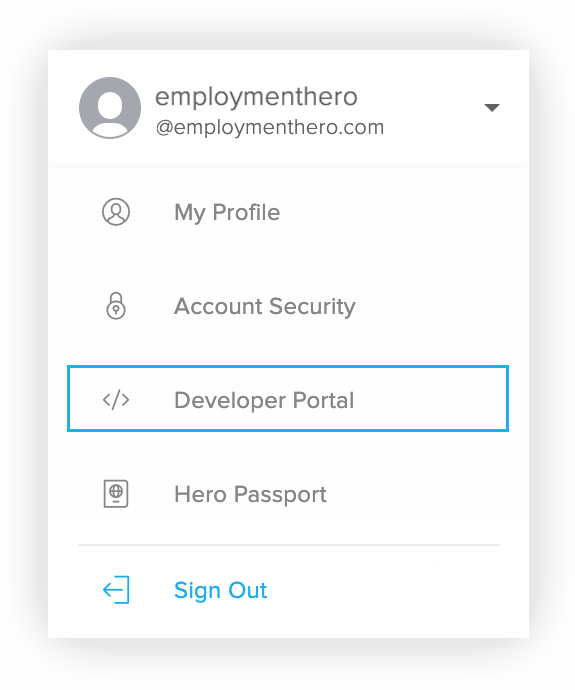
To access the developer portal, visit and sign in to your Employment Hero account. The Developer Portal link is located in the menu under your profile name in the top right corner. The developer portal includes the features:
- API (via OAuth 2.0)
- Webhooks
Obtain Credentials
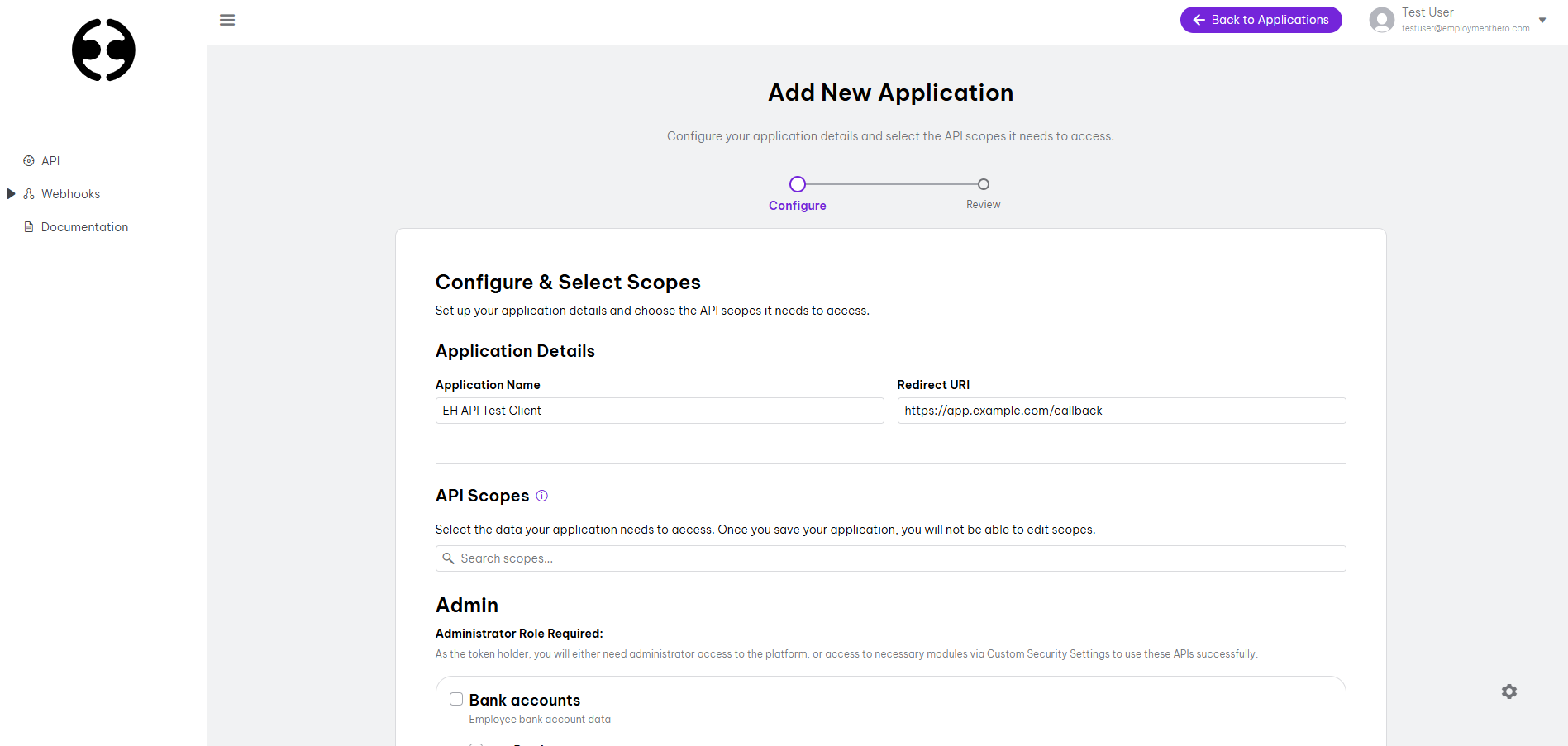
Visit the Developer Portal to register your application, below are the 3 fields required for creating an OAuth 2.0 application.
Application Properties
| Field | Description |
|---|---|
| Name | A meaningful name for your OAuth 2.0 application (e.g. EH API Test Client) |
| Scope | A list of scopes which the application can access. The scope list will be provided by Employment Hero. NOTE: For security and data sensitivity concerns, scopes are a one-time selection on application creation. |
| Redirect URI(s) | One or more URIs hosted by your company which a user will be redirected to following a successful OAuth handshake. Use a comma-separated list to add multiple redirect URIs. Please note that for security purposes, we request that you provide HTTPS URIs. |
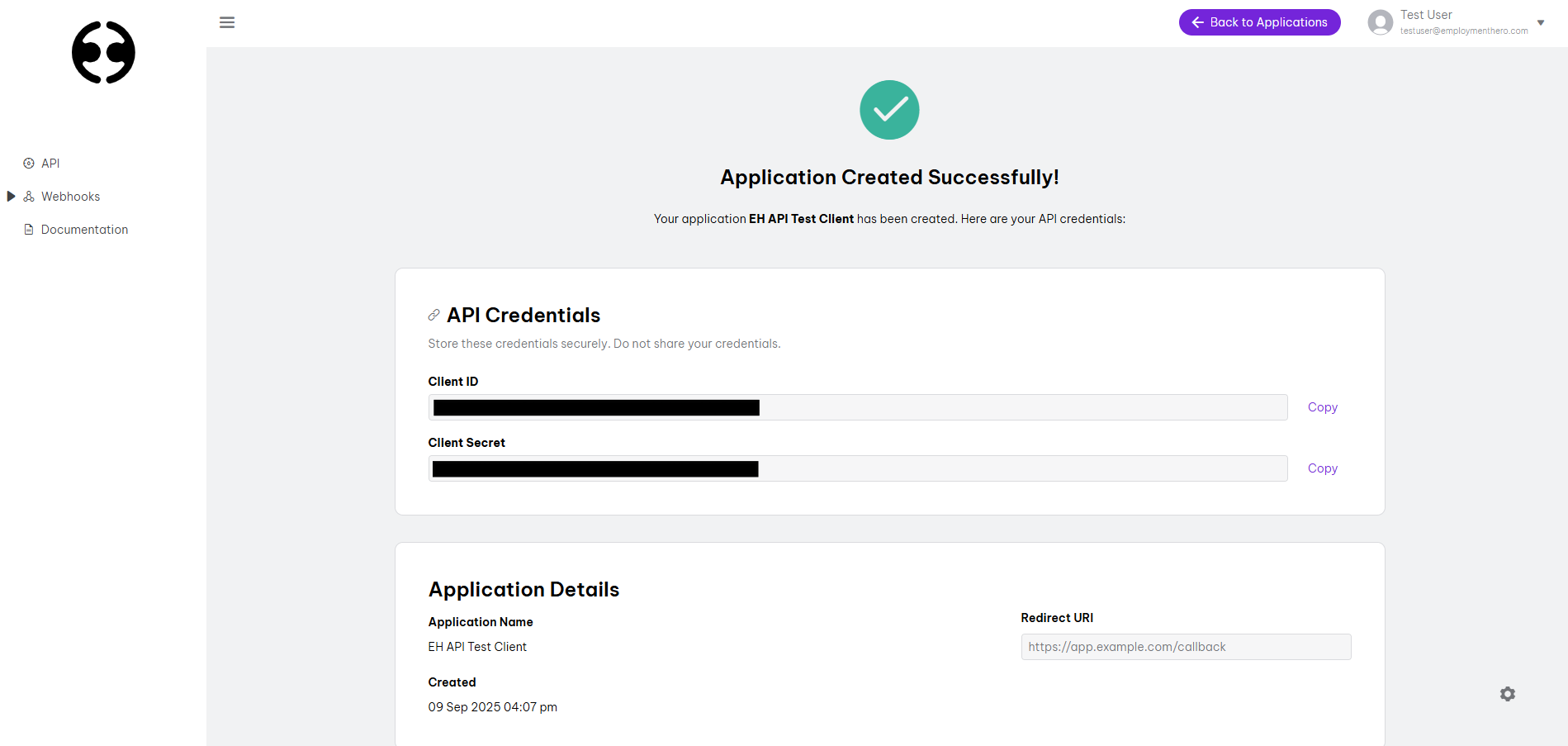
After registering a new OAuth 2.0 application, you can update your application properties except the scopes. The set of credentials includes client ID, secret and your application. Visit the application details page for the set of credentials (e.g. client ID, secret, application information) you will require in the upcoming steps. Below is the description of the generated credentials from the registration.
Credentials
| Attribute | Description |
|---|---|
| Client ID | A unique string representing the registration OAuth 2.0 application. |
| Client Secret | A random secret used by client to authenticate to the Employment Hero Authorisation Server. The client secret is a secret known only to the client and authorisation server. |
Obtain Access Token
OAuth 2.0 application credentials are used for obtaining the access token. We recommend using an admin or an owner type of account to ensure access to all relevant API endpoints.
PKCE Rollout
As part of the PKCE mandate rollout (effective 2026-09-30), the
code_challenge and code_challenge_method query parameters below, and the
code_verifier request body field, are required. Requests without them will
be rejected once the mandate takes effect.
client_id, client_secret, code, and code_verifier must be sent as
application/x-www-form-urlencoded in the request body, as shown in the
example below. Sending them as query parameters or JSON is no longer accepted.
Authorisation
Before your application can access private data over the Employment Hero API, it must obtain an access token that grants access to that API. Application scopes, which are selected in the previous step, control the set of API endpoints that you are requesting permission for. A single access token is a combination of those permissions. To grant access to your application, a request must be made to our Authorisation Server.
The user accessing the application will be prompted to log in to Employment Hero. After logging in, if the user does not have any Single Sign On organisation's or has already authenticated them, they can click on the skip button. Then the user will be asked to grant the requested permissions from your OAuth 2.0 application as well as the application scopes. A successful login and confirmed permissions will redirect the user back to your specified redirect URL, including the authorisation code. If the user does not grant the permissions, the server will return an error. The authorisation code can then be exchanged for an access token.
For users linked to Single Sign On (SSO) enforced organisations, only one SSO organisation can be authorised per access token. If the user selects and authorises an SSO organisation, the resulting token will include that SSO organisation along with any non-SSO organisations the user has access to. However, if access is required for multiple SSO organisations, the user must authorise each separately, generating a distinct token for each. Non-SSO organisations are automatically included in the access token without additional authorisation steps.
Note
The Employment Hero account used for authorisation can only access the data within its roles or permisions (e.g. the employee cannot see the owner information).
https:/oauth.employmenthero.com/oauth2/authorizeQuery Parameters
Your client ID from OAuth 2.0 credentials
One of your specified redirect url(s) in your OAuth 2.0 application
Use code here.
The PKCE code challenge. Derived by Base64URL-encoding (no padding) the SHA-256 hash of the code_verifier: BASE64URL(SHA256(code_verifier)).
The challenge method used to generate code_challenge. Must be S256.
Example
curl -X GET \"https://oauth.employmenthero.com/oauth2/authorize?\client_id=u6zcls9nx3b9Lq0sSLgUiTgRhMM3Miwx9KytOUrC9d0&\redirect_uri=https://app.example.com/callback&\response_type=code&\code_challenge=E9Melhoa2OwvFrEMTJguCHaoeK1t8URWbuGJSstw-cM&\code_challenge_method=S256"Response
// example of successful logging in and granting permission// where https://app.example.com/callback is your redirect urihttps://app.example.com/callback? \ code=7E2s5m5OHdNSPdtNMri6xNoKH62nwV_0hl9xdJ1g7fsAccess Token
The access token is required to access protected resources. It represents an authorisation issued to the client and will expire after 15 minutes. To obtain it, request an access token from our Authorisation Server. The request requires client_id, secret, and your granted authorization_code for security purposes. The response data includes access_token, refresh_token and token_type which indicates the correct authorisation type for the access token. There are many types of authorisation when making a request, currently we only support the Bearer type.
https:/oauth.employmenthero.com/oauth2/tokenQuery Parameters
Sent as URL query parameters.
Use authorization_code
Your redirect URI listed in the OAuth 2.0 application
Request Body
client_id, client_secret, and code must be sent as application/x-www-form-urlencoded in the request body.
Client ID from OAuth 2.0 application credentials
Secret from OAuth 2.0 application credentials
Authorization code obtained from the Authorisation Server, extracted from the redirect URI parameters in the previous step
The PKCE code verifier used to generate the code_challenge in the authorisation step. Must be a cryptographically random string of 43–128 unreserved URI characters (A-Z, a-z, 0-9, -, ., _, ~).
Response Body
The granted access token.
The token required to refresh the access token.
Type of authorisation used to access protected API. NOTE: only the Bearer type is currently supported
Lifetime of the access token (in seconds)
Granted scopes for this access token
Example
curl -X POST \"https://oauth.employmenthero.com/oauth2/token?\grant_type=authorization_code&\redirect_uri=https://app.example.com/callback&" \ --data-urlencode "code_verifier=dBjftJeZ4CVP-mB92K27uhbUJU1p1r_wW1gFWFOEjXk" \ --data-urlencode "client_id=u6zcls9nx3b9Lq0sSLgUiTgRhMM3Miwx9KytOUrC9d0" \ --data-urlencode "client_secret=75bAHTX7oo2ksTgnZO71BHMnmkyuaYAQzbgIeBPoecw" \ --data-urlencode "code=7E2s5m5OHdNSPdtNMri6xNoKH62nwV_0hl9xdJ1g7fs"Response
{ "access_token": "eyJhbGciOiJSUzI1NiJ9.joxNT...xC5vm9EwF3wDpFg", "refresh_token": "PDhcuwQPVMU9XPVpSPekPdpbkY-mm7snmd-5nWVqjg4", "token_type": "bearer", "expires_in": 900, "scope": "urn:mainapp:organisations:read urn:mainapp:employees:read"}Use Access Token
After obtaining the access token from the Employment Hero Authorisation Server, request to the Employment Hero API must include the access token via HTTP authorisation header. All configured scopes can be seen in your OAuth 2.0 application from the Employment Hero Developer Portal page.
PKCE Rollout
As part of the PKCE mandate rollout (effective 2026-09-30), access tokens must be obtained using the PKCE flow. Refer to Obtain Access Token for the updated request parameters. The bearer token usage below is unchanged.
https:/api.employmenthero.com/api/v1/organisationsPath Parameters
The access token to use for the request
curl -X GET \ "https://api.employmenthero.com/api/v1/organisations" \ -H "Authorization: Bearer AUXJ3123xyrj123fdsjkl124aAJKQ"Refresh Access Token
Access tokens expire after 15 minutes. For continuous usage, a new access token must be requested using the refresh token.
PKCE Rollout
As part of the PKCE mandate rollout (effective 2026-09-30), the refresh token used here must have been issued from an access token originally obtained via the PKCE flow. No additional PKCE parameters are required for the refresh request itself.
client_id and client_secret must be sent as
application/x-www-form-urlencoded in the request body, as shown in the
example below. Sending them as query parameters or JSON is no longer accepted.
Note
The same refresh token can be used to refresh the access token each time.
https:/oauth.employmenthero.com/oauth2/tokenQuery Parameters
Sent as URL query parameters.
Use refresh_token
The refresh token obtained from the previous access token request or last refresh token request.
Request Body
client_id and client_secret must be sent as application/x-www-form-urlencoded in the request body.
Client ID from OAuth 2.0 application credentials
Secret from OAuth 2.0 application credentials
Response Body
The granted access token.
The refresh token to refresh access token.
Type of authorisation used to access protected API
Lifetime of the access token (in seconds)
Granted scopes for this access token
Example
curl -X POST \"https://oauth.employmenthero.com/oauth2/token?\grant_type=refresh_token&\refresh_token=lEzwW-7rz-AiLPo1ZDP0ZFEHzIwAzMbV3yfk7rsJSfs" \ --data-urlencode "client_id=u6zcls9nx3b9Lq0sSLgUiTgRhMM3Miwx9KytOUrC9d0" \ --data-urlencode "client_secret=75bAHTX7oo2ksTgnZO71BHMnmkyuaYAQzbgIeBPoecw"Response
{ "access_token": "eyJhbGciOiJSUzI1NiJ9.joxNT...xC5vm9EwF3wDpFg", "refresh_token": "kgIaDcs5iy1jw9KN5jz84sSiGnrDr_XW5UYKwueBFDc", "token_type": "bearer", "expires_in": 900, "scope": "urn:mainapp:organisations:read urn:mainapp:employees:read"}